YouTube Tools
4 min read
•Updated 2026-10-03
How to Download YouTube Shorts in 4K & 1080p
Save YouTube Shorts in full HD or 4K with sound — free, no software. The exact steps and how to keep the original quality.
Md Atiar Rahman Ovi
Lead Systems Architect, Vidzory Media Lab
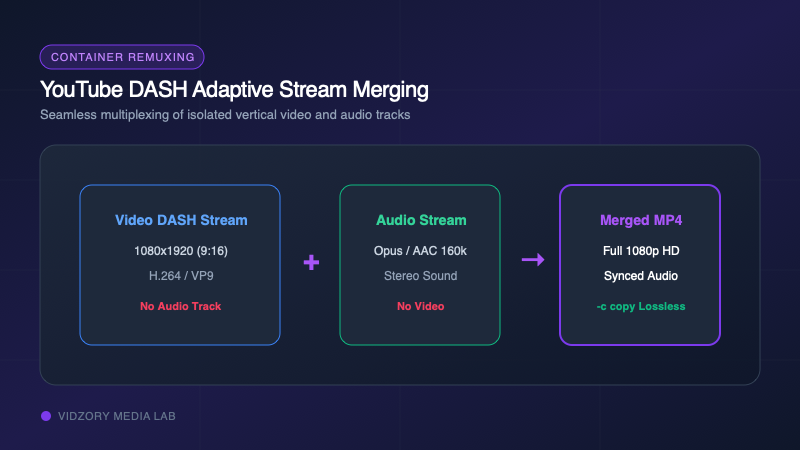
YouTube Shorts are now generating tens of billions of views daily. Creators and editors frequently need to archive their uploaded Shorts or download authorized clips for video reaction commentary. However, many basic downloaders fail completely on Shorts links or output silent videos because YouTube splits vertical HD video and audio into separate streams. Here is how to save YouTube Shorts with lossless sound.
Why YouTube Shorts Break Old Downloaders
Older downloading scripts look for legacy progressive URLs where video and audio are pre-combined into a single low-resolution file. YouTube discontinued progressive video for HD resolutions over a decade ago. For all 1080p content and Shorts, YouTube uses Dynamic Adaptive Streaming over HTTP (DASH). Vidzory fetches both streams in parallel and losslessly muxes them into a single standard MP4 file.
Three Simple Steps to Save Any Public Short
1. On your phone or desktop, tap Share on the Short and tap Copy Link (links look like youtube.com/shorts/VIDEO_ID).
2. Open Vidzory and paste the link into the YouTube Downloader.
3. Choose 1080p Full HD MP4 and click Download.