Video Compression
6 min read
•
Updated 2026-10-03

How to Compress a Video for Discord, Email & WhatsApp

Every platform's video size limit (Discord 10MB, WhatsApp 16MB, Gmail 25MB) and the exact settings to fit each — free, no software.

Md Atiar Rahman Ovi

Lead Systems Architect, Vidzory Media Lab
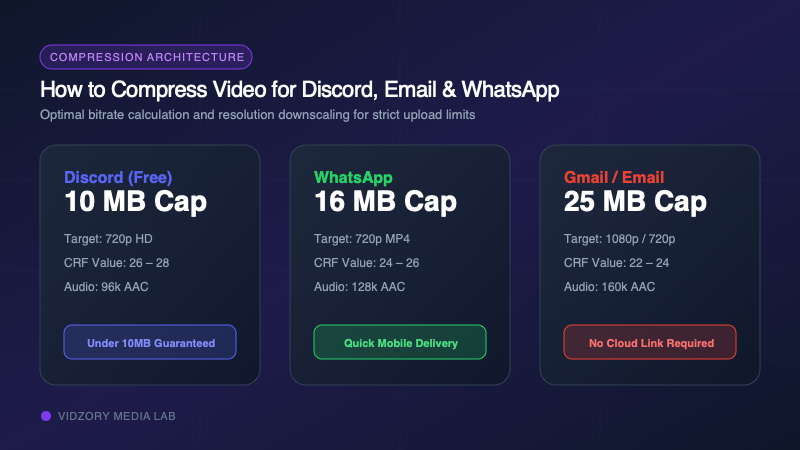
Comparison diagram of video compression target limits for Discord, WhatsApp, and Gmail
Platform file size limits and optimal resolution downscaling targets for messaging apps.

Have you ever recorded a crisp 30-second screen capture or phone video, only to have Discord reject it with "Your file is too powerful" or Gmail bounce your message because the attachment exceeded 25MB? Modern smartphone cameras record 4K at 60 FPS with bitrates upwards of 50 Mbps—meaning a simple 10-second clip easily swells past 60 MB. In this guide, you will learn the exact size thresholds for every major platform and the 3 proven levers to shrink videos under the limit while keeping them crystal clear.

Platform Video Upload Limits at a Glance

Each messaging service enforces strict file size barriers. If your attachment exceeds the cap by even a single kilobyte, the server drops the upload entirely. Here are the current operational limits:
PlatformFree Tier LimitPremium Tier LimitRecommended Target Size
Discord10 MB50 MB (Nitro Basic) / 500 MB (Nitro)8.5 MB - 9.5 MB
WhatsApp16 MB (Standard Media)2 GB (Sent as Document)14 MB - 15 MB
Gmail / Outlook25 MB (Gmail) / 20 MB (Outlook)Google Drive / OneDrive Link18 MB - 22 MB
Telegram2 GB (Free)4 GB (Telegram Premium)Under 1.5 GB
Slack1 GB (Workspace Shared)Unlimited (Workspace Storage)Under 50 MB
iMessage / SMS100 MB (iMessage) / 1 MB (MMS)N/AUnder 80 MB

Discord raised their free attachment limit from 8MB to 25MB temporarily, then permanently revised it to 10MB. Always aim for 9.0 MB to leave headroom for container headers.

Why Modern Phone Video Is So Massive

The total file size of any video is governed by a simple mathematical formula: File Size = (Video Bitrate + Audio Bitrate) × Duration ÷ 8 When your iPhone or Samsung Galaxy records at 4K 60fps, it encodes at roughly 60,000 kbps (kilobits per second). That generates approximately 7.5 megabytes of data every single second. A 30-second clip reaches 225 MB. To fit under Discord’s 10 MB ceiling, you must reduce that bitrate from 60,000 kbps down to approximately 2,200 kbps.

The 3 Levers to Shrink Any Video (In Order of Priority)

Do not blindly compress high-frame-rate 4K files. Execute these three adjustments in sequence for optimal visual fidelity: 1. Trim Unnecessary Seconds: Cut dead frames before and after the action. Trimming a 30-second clip to 15 seconds instantly halves the file size without touching video quality. 2. Downscale Resolution to 720p: On phone screens and Discord chat windows, 720p (1280x720) looks virtually indistinguishable from 1080p, but requires 55% fewer pixels to encode. 3. Apply Intelligent CRF Rate Control: Use Constant Rate Factor (CRF) encoding rather than constant bitrate. CRF allocates more bits to complex action scenes and saves bits during static shots.

Exact Settings for Discord (Under 10MB)

To consistently squeeze a 30 to 60-second video under Discord’s 10MB limit without making it look like a pixelated potato: • Container: MP4 (H.264 / AVC video + AAC audio) • Resolution: 1280x720 (720p HD) or 854x480 (480p SD for longer clips) • CRF Value: 26 to 28 (higher number = smaller file) • Audio Bitrate: 96 kbps to 128 kbps stereo • Target Bitrate Formula: 8,000 kb ÷ Duration in seconds = Max Video Bitrate (kbps)

Exact Settings for Email Attachments (Under 25MB)

For Gmail, Outlook, or corporate email servers, target 20MB to ensure your email passes spam filters and intermediate SMTP relay size checks. Encode at 1080p with CRF 24–26, or 720p with CRF 22 for ultra-crisp presentation slides and software tutorials.

The Fast One-Click Method: Vidzory Online Compressor

You do not need to install HandBrake or memorize FFmpeg command-line flags. Vidzory’s free browser-based video compressor runs high-speed containerized FFmpeg in the cloud: 1. Upload your source MP4, MOV, or WebM file. 2. Select your compression preset (Discord 10MB, Email 25MB, or custom CRF). 3. Download your compressed file instantly with zero watermarks or quality loss.

Frequently Asked Questions

Can I compress a video without losing visible quality?

Yes. By removing redundant bitrate, downscaling from 4K to 720p, and using modern H.264/H.265 compression algorithms, human eyes cannot perceive compression differences on mobile or laptop displays.

Does Vidzory add any watermark to compressed videos?

No. Vidzory never stamps logos, watermarks, or branding onto your media files. Your output is 100% clean and original.