Format Conversion
6 min read
•Updated 2026-10-03
How to Convert MKV, WebM & MOV to MP4 (Free Online)
Convert MKV, WebM, MOV and more to MP4 — free, fast, lossless re-encoding. Why MP4 is the most compatible format, and how to convert.
Md Atiar Rahman Ovi
Lead Systems Architect, Vidzory Media Lab
Have you ever recorded gaming footage with OBS Studio only to get an MKV file that Adobe Premiere Pro refuses to open? Or downloaded a WebM clip from the internet that will not play on your iPhone or upload to Instagram? Video container incompatibilities are among the most frustrating roadblocks in video production. In this guide, you will learn the difference between containers and codecs and how to convert any file to universal MP4 format.
Container vs Codec: What Is the Difference?
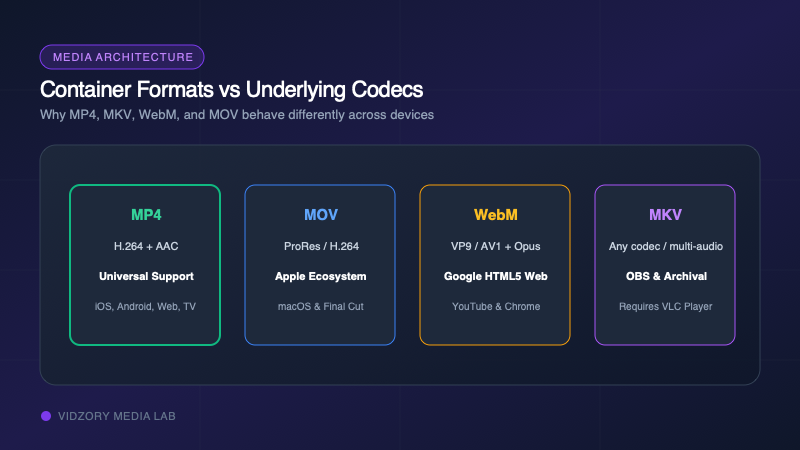
Think of a container format (like .mp4, .mkv, .webm, or .mov) as a digital shipping box. Inside that box are two separate items: the video stream (usually encoded with H.264, HEVC, or VP9) and the audio stream (AAC, MP3, or Opus).
• MKV (Matroska): An open-source powerhouse capable of holding unlimited audio tracks and subtitles. Loved by OBS and torrent communities, but rejected by Apple QuickTime and Instagram.
• WebM: Google’s royalty-free web container designed for HTML5 video. Lightweight, but unsupported by older video editing suites.
• MOV: Apple’s native QuickTime container. Works great on macOS, but often creates playback headaches on Windows and Android.
• MP4: The universal global standard supported by every TV, phone, game console, and social network in existence.
Container Comparison Matrix
Here is how the four major container types compare across device and platform ecosystems:
| Container | iOS / Mac Support | Windows / Android | Premiere / Final Cut | Social Media Uploads |
|---|---|---|---|---|
| MP4 (.mp4) | 100% Native | 100% Native | 100% Supported | Universal (All platforms) |
| MOV (.mov) | 100% Native | Requires Codec Pack | Fully Supported | TikTok & Instagram only |
| WebM (.webm) | Partial (Modern iOS) | 100% Native | Requires 3rd-party plugin | YouTube & X only |
| MKV (.mkv) | None (Requires VLC) | Requires 3rd-party app | Not Supported natively | Rejected by most platforms |